


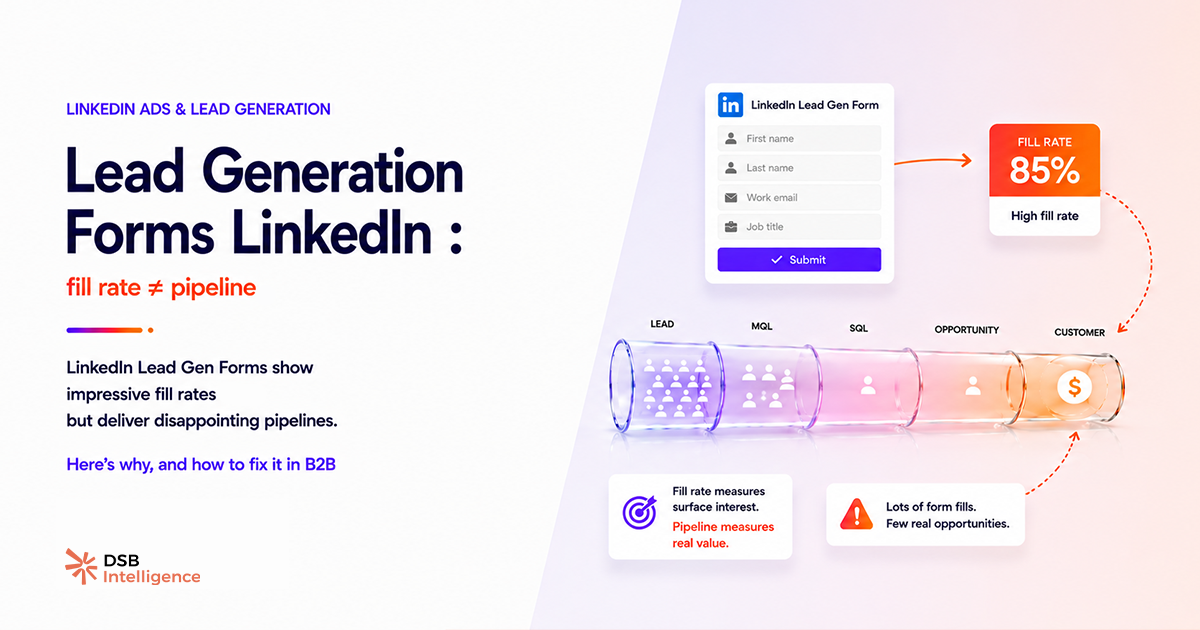
A high fill rate on your LinkedIn Lead Gen Form campaign is not proof it's working. It's proof the form is easy to submit.
TL;DR
- LinkedIn Lead Gen Forms reduce friction so aggressively that they also remove the qualification step that separates buyers from browsers.
- A high fill rate on a lead gen ad on LinkedIn is a warning sign, not a success metric — it means your offer is easy to claim, not that it's valuable to the right people.
- The format works best for high-value, specific offers (audits, demos, calculators) where the ask itself filters intent.
- Audience targeting on LinkedIn ads for lead generation is more important than creative — a precise ICP definition cuts volume but doubles SQL rate.
- LinkedIn Sales Navigator for lead generation and paid Lead Gen Forms serve different pipeline stages and should never share the same KPIs.
- Post-submit speed matters: leads contacted within 24 hours convert at a meaningfully higher rate than those sitting in a weekly export.
- Measuring LinkedIn lead generation advertising by CPL alone ignores the cost of sales time spent on unqualified leads — cost-per-SQL is the right denominator.
Why do lead generation forms on LinkedIn inflate fill rate by design?
LinkedIn pre-fills the form with the member's profile data — name, email, job title, company — before the prospect ever reads a word of your offer. One tap, done. That's the product feature LinkedIn sells as a benefit. It is a benefit, but only if your goal is volume. If your goal is pipeline, it's a liability.
The mechanism is straightforward: removing friction removes the moment of deliberate decision. A prospect who fills out a landing page form has, at minimum, clicked an ad, waited for a page to load, read some copy, and typed their email. Each of those micro-steps is a small commitment. Commitment correlates with intent. LinkedIn Lead Gen Forms skip all of it.
The result is a predictable pattern: fill rates that look strong in the campaign dashboard, SQL rates that disappoint in the CRM, and a sales team that stops trusting marketing's numbers.
This isn't a LinkedIn-specific failure. It's a format-intent mismatch. The format was built for volume. Most B2B teams deploy it expecting quality. Those two goals need different setups.
The fill rate trap in practice
Consider a SaaS company running a lead gen ad on LinkedIn promoting a generic "B2B automation guide." The CPL looks efficient. The fill rate is strong. But when sales works through the list, a large share of contacts are individual contributors with no buying authority, students, or professionals from industries the product doesn't serve. The offer — a free guide — attracted everyone. That was always going to be the outcome.
Swap the offer for "a 30-minute live audit of your current automation stack" and the fill rate drops sharply. But the people who submit now have a specific problem, a calendar, and a reason to show up. That's a different conversation entirely.
What offer types actually qualify intent on LinkedIn lead generation advertising?
The offer is the first filter. It does more qualification work than any audience setting.
Generic content assets (eBooks, whitepapers, "ultimate guides") are the worst performers for pipeline quality. They attract the broadest possible audience — students, researchers, competitors, and curious professionals with no budget. The download is frictionless and costless to the prospect, so it signals nothing about buying intent.
High-specificity offers flip the dynamic. Examples that consistently produce better SQL rates across B2B categories:
- Live product demos — requires scheduling, signals active evaluation
- Personalised audits (SEO audit, stack audit, security review) — requires context-sharing, signals a real problem
- ROI or benchmark calculators — requires input, signals a decision in progress
- Exclusive peer research (not a vendor report, but data the prospect can't get elsewhere) — signals professional investment
The principle: the offer should be slightly inconvenient to claim. Not painful — just specific enough that someone without a genuine use case self-selects out.
This is where LinkedIn B2B lead generation diverges from lead gen on Meta or Google. LinkedIn's audience is professional and context-aware. They respond to offers that respect their time and speak to a specific role problem. A "free guide" feels like noise. A "30-minute audit for RevOps teams managing 3+ tools" feels relevant.
How does audience targeting change the economics of LinkedIn ads for lead generation?
Creative gets the attention. Targeting determines who sees it. For B2B lead generation advertising on LinkedIn, targeting is the higher-leverage variable.
The default mistake is layering too few dimensions. Job title alone is weak — "Marketing Manager" spans a 22-year-old coordinator and a VP with a $500K budget. Add company size, seniority level, and function together, and you're describing a person, not a job label.
The strongest audience configurations for LinkedIn B2B lead generation:
- Matched Audiences from CRM — retargeting contacts already in your pipeline or past customers. These audiences have demonstrated intent by existing in your ecosystem.
- Website retargeting — visitors who hit your pricing or solutions pages. They've already done research; the form is a conversion step, not a cold ask.
- Account-based lists — upload a target account list from LinkedIn Sales Navigator for lead generation outreach, then serve Lead Gen Form ads only to those accounts. This bridges outbound targeting with inbound capture.
Broad interest-based targeting on LinkedIn is rarely the right call for B2B. It widens the funnel at the top, but the SQL rate at the bottom rarely justifies the CPL.
One practical calibration: if your lead gen campaign is producing more than 50 leads per week from a single ad set, the audience is probably too broad. Tighten it until volume drops to a level your sales team can actually work — and work fast.
Why does follow-up speed determine whether LinkedIn lead generation converts to pipeline?
A LinkedIn Lead Gen Form submission happens in a scroll context. The prospect wasn't on your website, wasn't in a buying session, wasn't comparing vendors. They were in their feed. They saw something relevant, tapped submit, and kept scrolling.
That context means intent decays quickly. The lead is warm for hours, not days. A same-day follow-up — ideally within a few hours — reaches the prospect while the brand interaction is still in working memory. A batch export processed at the end of the week reaches someone who has no recollection of submitting.
This is a systems problem, not a motivation problem. Most teams fail here because their LinkedIn lead generation advertising workflow disconnects the ad platform from the CRM. Leads sit in Campaign Manager exports, get downloaded manually, get imported into a CRM, get assigned, and eventually get contacted. By then, the window is closed.
The fix is a direct integration: LinkedIn's native CRM connectors (HubSpot, Salesforce, and others) or a webhook via Zapier/Make that fires an assignment and a follow-up task the moment a form is submitted. This isn't optional infrastructure for a high-volume campaign — it's the difference between a 5% and a 20% contact rate.
DSB Intelligence's Recommendations Engine flags this pattern when it detects a consistent gap between form submission timestamps and first CRM activity — it surfaces the delay as a pipeline leak, not just a process note, so the team can act on it with data rather than instinct.
How should you measure LinkedIn B2B lead generation to see the real picture?
Cost-per-lead is the metric LinkedIn Campaign Manager shows you by default. It's also the metric most likely to mislead you.
CPL measures the cost of getting someone to tap a button. It says nothing about whether that person can buy, will buy, or is even in the right industry. A campaign with a CPL of $18 and a 3% SQL rate is more expensive than a campaign with a CPL of $65 and a 25% SQL rate — once you factor in the sales hours spent disqualifying the first batch.
The metrics that actually describe pipeline health from LinkedIn lead generation advertising:
| Metric | What it measures | Why it matters | |---|---|---| | SQL rate (leads → sales-qualified) | Offer + audience fit | Reveals targeting precision | | Cost-per-SQL | True acquisition cost | Comparable to other channels | | Time-to-contact | CRM integration health | Predicts contact rate | | Lead-to-opportunity rate | Sales process fit | Reveals ICP accuracy | | Pipeline influenced (90-day) | Revenue contribution | The only metric finance cares about |
If your reporting stops at CPL and fill rate, you're optimising for the dashboard, not the business. The fix is connecting Campaign Manager data to CRM stages — not a complex integration, but a non-negotiable one for any team spending meaningfully on LinkedIn ads for lead generation.
For a broader look at how organic and paid signals interact on LinkedIn, What Are LinkedIn Impressions — and What They Miss covers the measurement gaps that affect both sides of the channel.
Frequently asked questions
Why do LinkedIn Lead Gen Forms produce low-quality leads despite high fill rates?
Because the format removes all friction — pre-filled fields, no redirect, one tap to submit. Low friction attracts low intent. Prospects submit without reading your offer carefully, which means many have no genuine buying interest.
What offer types work best with lead gen ads on LinkedIn?
Specific, high-value offers that require commitment to be useful: live product demos, personalised audits, ROI calculators, or exclusive research. Generic content downloads (eBooks, whitepapers) attract the widest audience and the lowest intent.
How do you measure LinkedIn B2B lead generation properly?
Track cost-per-SQL (sales-qualified lead), not cost-per-lead. Map every lead from the form submission to CRM stage. If your CPL is low but your SQL rate is under 10%, the campaign is losing money on sales time, not saving it on media spend.
Should LinkedIn Sales Navigator for lead generation replace paid Lead Gen Forms?
No — they operate at different pipeline stages. Sales Navigator identifies and prioritises outbound targets. Lead Gen Forms capture inbound intent. Conflating the two KPIs (connection rate vs. fill rate) produces misleading pipeline forecasts.
How quickly should you follow up on LinkedIn lead generation form submissions?
Within 24 hours at most. The lead submitted in a LinkedIn context — scrolling a feed, not actively researching. Intent decays fast. A same-day follow-up while the brand is still in memory dramatically outperforms a batch export processed days later.
What audience settings reduce low-quality leads on LinkedIn lead generation advertising?
Layer job seniority + function + company size simultaneously. Avoid broad interest-based targeting for B2B. Enable the 'Matched Audiences' feature to retarget website visitors or CRM contacts — these audiences already have demonstrated intent.
Now what?
- Audit your current offer. If it's a content download, replace it with a specific, role-relevant ask (audit, demo, calculator). Measure SQL rate before and after — not fill rate.
- Tighten your audience. Add at least three targeting dimensions simultaneously. If weekly lead volume drops below 20, that's a sign you're reaching the right people, not a problem to fix.
- Connect your CRM in real time. Set up a native LinkedIn integration or a webhook so every form submission triggers an immediate assignment and follow-up task. Eliminate the batch export step entirely.
- Switch your reporting KPI to cost-per-SQL. Pull the last 90 days of leads, map them to CRM stages, and calculate the real acquisition cost per sales-qualified lead. Then read B2B Marketing with LinkedIn: Fix the System First to align the rest of your LinkedIn system around that number.
If you want to track which campaigns actually contribute to pipeline — not just fill your CRM with noise — try DSB Intelligence free and connect your LinkedIn analytics to the metrics that matter.