


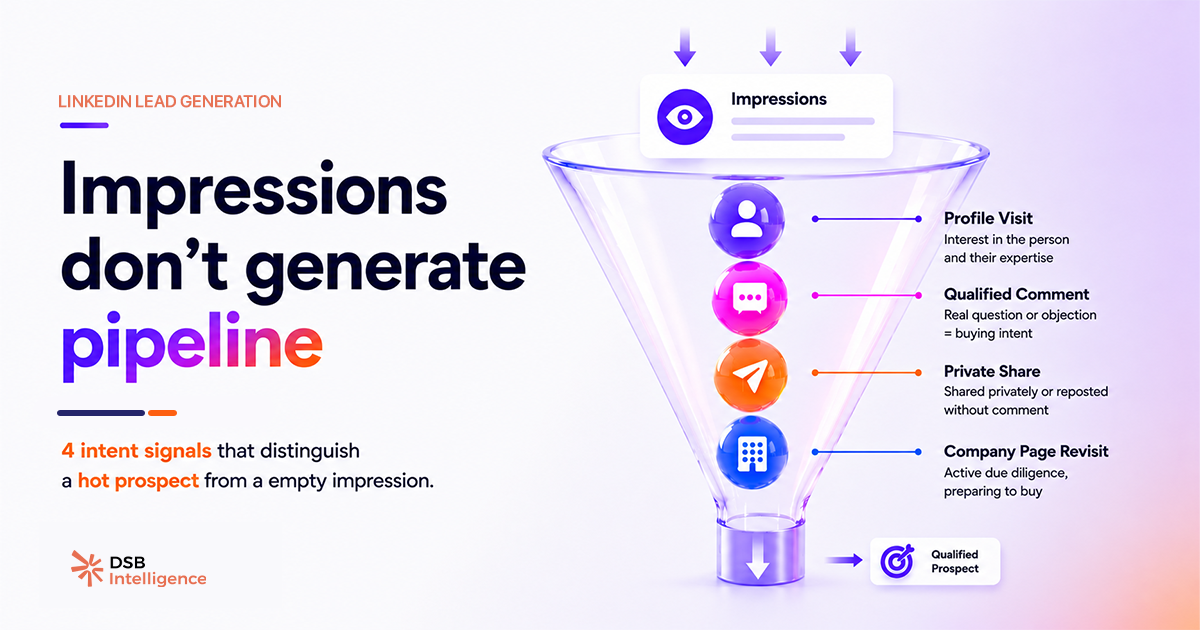
Most LinkedIn lead generation advice optimizes for the wrong thing. More posts, better hooks, optimal hashtags — all of it chases impressions. Impressions don't sign contracts.
The practitioners generating consistent B2B pipeline from LinkedIn aren't posting more. They're reading different signals.
Why do impressions and likes fail as lead generation metrics on LinkedIn?
Impressions measure how many times a post appeared on a screen. They say nothing about who stopped, who read, or who thought "this is my problem."
A like takes one thumb movement. It's the lowest-friction action on the platform — which is exactly why it's the least predictive of purchase intent. The prospects closest to buying often don't like anything publicly. They read quietly, visit your profile, and disappear. If you're optimizing for likes, you're optimizing for the audience least likely to convert.
For a deeper look at what impression counts actually capture — and what they systematically miss — What Are Post Impressions on LinkedIn — and What They Miss breaks down the gap between distribution and intent.
The shift required for real lead generation from LinkedIn is simple to state and hard to execute: stop measuring what's easy to count, start tracking what predicts a conversation.
What are the 4 intent signals that actually predict B2B pipeline?
These four signals don't require a paid tool to spot. They do require a system to track consistently.
Signal 1 — Repeated profile visits from the same account.
One profile view is curiosity. Two or three views from the same person within a week is research. That's someone building a case, comparing options, or preparing to reach out. LinkedIn surfaces this in your "Who viewed your profile" feed — but only if you check it with intent, not passively.
The filter that matters: does the viewer's title and company match your ICP? If yes, that's a warm prospect who hasn't raised their hand yet. You can raise yours first.
Signal 2 — Comments that describe a specific problem.
"Great post!" is noise. "We're dealing with exactly this — our team has been struggling with X for two quarters" is a buying signal dressed as a comment.
Problem-specific comments reveal two things simultaneously: the prospect has the pain, and they're comfortable enough to say so publicly. That's a low-friction entry point for a direct message that references their exact words. No cold open required.
Signal 3 — Saves on pain-point content.
When someone saves a post, they're telling the algorithm — and you — that they plan to return. Saves on content tied to a specific business problem indicate the prospect is bookmarking a potential solution, not just a piece of interesting reading.
LinkedIn doesn't notify you who saved your post. But the save count is visible, and a spike in saves on a specific piece of content tells you the framing resonated with people who have that problem right now. That's the post worth amplifying, and the topic worth going deeper on in your next piece.
Signal 4 — Connection requests sent after content exposure.
When someone connects with you after seeing a post — especially without a note — they've self-identified. They saw your content, recognized relevance, and took an action. That's warmer than any cold outreach you'll ever send.
The follow-up move here isn't to pitch immediately. It's to send a short, specific message that references the content context: "Saw you connected after the post on [topic] — happy to share the framework we use if it's useful." That's a conversation opener, not a sales sequence.
How do you build a tracking system for LinkedIn intent signals?
Spotting a signal once is luck. Catching signals consistently across 10, 20, or 50 posts per month requires a layer of structure.
The minimum viable system: a weekly 20-minute review. Check profile visitors against your ICP list. Scan comments on recent posts for problem language. Note connection requests and their likely content trigger. Log the ones that match — title, company, signal type, date.
That log becomes your outreach queue. It's not a CRM replacement; it's a prioritization filter. The prospects at the top aren't the ones who liked the most posts. They're the ones who showed up multiple times, in multiple ways, without being asked.
This is where DSB Intelligence's Recommendations Engine becomes relevant: it flags accounts that appear repeatedly across your content engagement — profile visits, saves, comment patterns — and surfaces them as priority signals before you'd notice them manually. The system doesn't replace your judgment on who to contact; it removes the part where you miss someone because you were busy posting.
For teams running LinkedIn alongside paid acquisition, the signal logic applies to ads too. LinkedIn Ads Benchmark: What the Averages Hide covers why aggregate benchmarks obscure the account-level patterns that actually matter for pipeline.
Why does most LinkedIn lead generation advice ignore these signals?
Because signals are harder to teach than tactics. "Post at 8am on Tuesdays" is a rule anyone can follow. "Read the behavioral pattern across a prospect's three touchpoints and decide when to reach out" requires judgment — and a system to surface the data in the first place.
The spray-and-pray model — post daily, connect with everyone, DM immediately — works at volume. It also burns your reputation with the exact buyers you most want to reach. Senior decision-makers at mid-market and enterprise companies recognize a sequence when they see one.
The alternative is slower to build and faster to convert. A prospect who has seen your content three times, visited your profile twice, and saved one of your posts is not a cold lead. Treating them like one is the mistake.
B2B Marketing with LinkedIn: Fix the System First makes the case for why the workflow underneath your content strategy determines whether any of this compounds — or just produces a steady stream of impressions that go nowhere.
How do you connect content strategy to lead generation on LinkedIn?
Content that generates pipeline isn't content that gets the most likes. It's content that attracts the right readers and gives them a reason to signal intent.
That means writing for a specific problem, not a broad topic. "How to improve your marketing" attracts everyone and converts no one. "Why your LinkedIn content gets impressions but no pipeline" attracts the exact person who has that problem and is actively looking for a fix.
The specificity is the filter. It reduces your reach and increases your conversion rate — which is the correct trade-off for lead generation on LinkedIn when your ICP is a defined segment, not the entire feed.
Timing compounds this effect. A post that lands when your ICP is actively in decision mode — end of quarter, budget cycle, post-conference — generates more intent signals than the same post published at a neutral moment. Best Time to Post on LinkedIn: Find Your Window covers how to find that window for your specific audience rather than relying on platform-wide averages.
If you're running LinkedIn Lead Gen Forms alongside organic content, the same signal logic applies: fill rate is not the metric that predicts revenue. LinkedIn Lead Gen Forms: Fix Fill Rate vs. SQL Rate explains why optimizing for form completions often moves you further from qualified pipeline, not closer.
Now what?
-
Audit last week's profile visitors. Cross-reference against your ICP by title and company. Flag anyone who visited more than once. That's your outreach list for this week — not your follower count.
-
Re-read the comments on your last five posts. Separate problem-specific language from generic praise. The former gets a direct reply and a DM. The latter gets a like and nothing else.
-
Check your save counts by post topic. The topic with the highest saves is the one your ICP is actively researching. Write the next piece there, not on the topic that got the most likes.
-
Build the log. A simple spreadsheet — date, name, company, signal type, follow-up sent — turns a weekly habit into a compounding pipeline system.
If you want the signal-tracking layer without the manual overhead, start a free trial of DSB Intelligence and let the Recommendations Engine surface the accounts worth your attention this week.