

Most people who search "linkedin com feed" are looking for one of two things: how to access their LinkedIn homepage, or how to pull LinkedIn posts into an RSS reader. Both questions lead to the same misunderstanding — and that misunderstanding has real distribution costs.
What exactly is linkedin.com/feed?
LinkedIn.com/feed is the ranked homepage feed of the LinkedIn platform. It is not a list. It is not a stream. It is a scored, personalized ranking of content that LinkedIn's system decides is relevant to you at this moment.
Every time you load the feed, LinkedIn runs a ranking pass across a candidate pool of posts from your connections, followed pages, and algorithmically suggested accounts. The result is a unique, ordered sequence — different for every user, different every hour.
This is the opposite of an RSS feed, which is a flat, chronological list of every item a source publishes, delivered in full to every subscriber.
Why does the RSS mental model break your distribution strategy?
If you think of your LinkedIn posts as RSS items, you implicitly assume full delivery: publish once, reach everyone who follows you. That assumption is wrong, and it shapes bad habits.
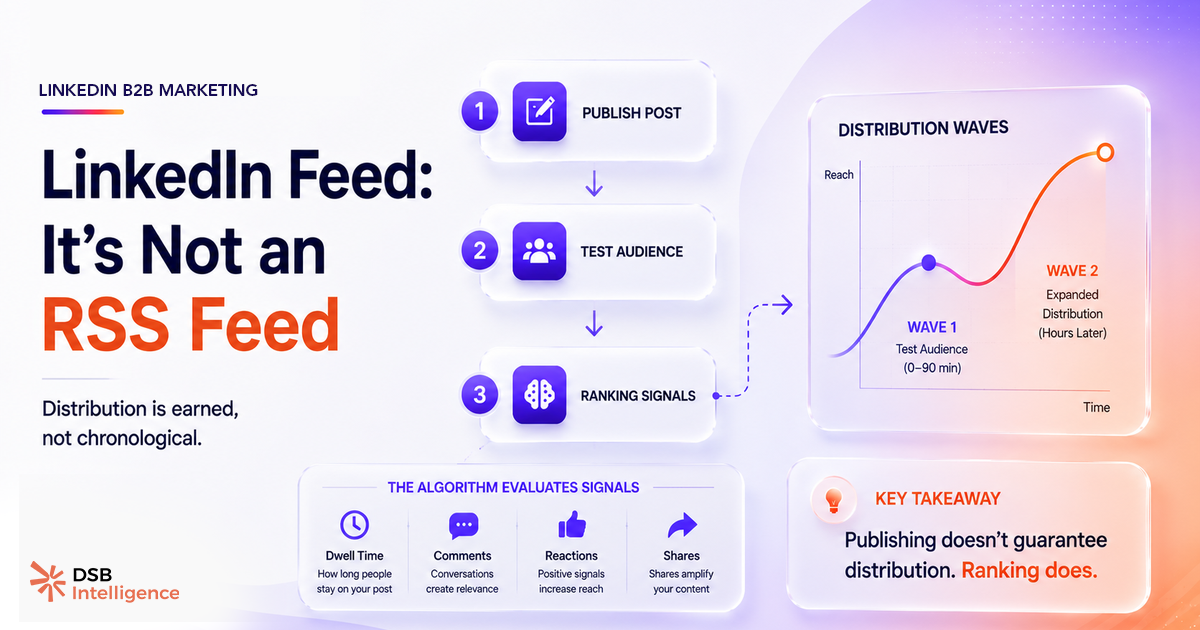
Passive posting — writing a post, hitting publish, and moving on — works fine in an RSS world. In LinkedIn's ranked feed, it fails. Your post enters a small initial distribution window, typically reaching a fraction of your followers first. LinkedIn then watches how that initial audience behaves.
Do they stop scrolling? Do they react? Do they comment within the first hour? If yes, the algorithm expands the post's reach to a broader audience. If not, the post quietly dies.
The practical implication: your distribution is not a function of your follower count. It's a function of your early-engagement quality. A post with 2,000 followers and a tight, engaged ICP audience can outperform a post from a 20,000-follower account that generates passive scrolling.
For a deeper look at the specific signals LinkedIn rewards in 2025, see LinkedIn Algorithm 2025: What It Actually Rewards.
Can you actually pull a LinkedIn RSS feed?
No — and this matters if you've been trying to embed LinkedIn posts on your website or aggregate them in a content dashboard.
LinkedIn removed native RSS support for profiles and company pages. There is no official endpoint at linkedin.com/feed that returns an RSS or Atom document. Any tool claiming to provide a "LinkedIn RSS feed" is either scraping the platform or using unofficial API workarounds — both of which violate LinkedIn's Terms of Service and break without warning when LinkedIn changes its markup.
The practical consequence: you cannot reliably embed a live LinkedIn feed on your website using RSS. If you need to surface LinkedIn content externally, LinkedIn's official embed widget is the only ToS-compliant option — and it comes with its own limitations (no bulk embedding, no filtering by post type).
This is also why "linkedin feed on website" solutions built on third-party scrapers are fragile by design. They work until they don't, and when they break, they take your content display with them.
How does the feed algorithm actually score your post?
LinkedIn has publicly acknowledged that time spent on a post — dwell time — influences its ranking. Beyond that, the behavior of your post's initial audience drives amplification.
The mechanism, as the industry broadly understands it, works in stages. First, LinkedIn delivers your post to a small seed audience — typically a subset of your most engaged connections. It measures early signals: reactions, comments, shares, and how long people actually pause on the post before scrolling past.
Strong early signals trigger a second distribution wave to a wider audience. Weak signals cap the post's reach at the seed level.
This is why When Is the Best Time to Post to LinkedIn is not a trivial question. Timing determines the quality of your seed audience. Post when your ICP is actively scrolling, and your early-engagement window fills with the right people. Post at 2am local time for your audience, and you seed the post with low-intent passive scrollers — the algorithm reads that as a weak signal.
DSB Intelligence's Insight Narrator surfaces this pattern directly: it breaks down your post's reach curve by hour, showing whether the first-wave audience triggered a second distribution wave or whether reach flatlined after the initial seed. That distinction — amplified vs. capped — is invisible in LinkedIn's native analytics, which only shows total impressions.
What should you measure instead of raw impressions?
Impressions count how many times your post appeared on a screen. They say nothing about whether it appeared in front of the right people.
The two metrics that actually map to distribution quality are reach-to-follower ratio and ICP overlap. Reach-to-follower ratio tells you what percentage of your audience the algorithm chose to show your post to — a low ratio on a well-timed post signals a weak early-engagement window, not a bad post. ICP overlap tells you whether the people who saw it were in your target segment.
Most LinkedIn analytics tools stop at impressions and engagement rate. As covered in LinkedIn Engagement Rate Benchmarks Are Mostly Fiction, aggregate engagement rate benchmarks obscure more than they reveal — the denominator (impressions) is too noisy to make cross-account comparisons meaningful.
For B2B teams, the relevant question is never "how many people saw this?" It's "did the right people see this, and did it move them?" That requires segmenting reach by job title, seniority, and company size — the kind of breakdown covered in LinkedIn Analytics Tools: Measure ICP Reach, Not Vanity.
Now what?
-
Stop treating LinkedIn like a broadcast channel. Every post you publish enters a competition for feed slots. Optimize for early-engagement quality, not publishing frequency.
-
Kill any RSS-based LinkedIn integration. If your website or dashboard pulls LinkedIn content via a third-party RSS workaround, audit it now. It violates LinkedIn's ToS and will break. Replace it with the official embed widget or a compliant API integration.
-
Track reach-to-follower ratio on every post. If it's consistently low despite strong content, the problem is timing or seed audience quality — not the post itself. Cross-reference with LinkedIn Analytics Tools: What B2B Teams Actually Need to identify the right instrumentation.
-
Measure ICP reach, not total reach. A post seen by 500 CFOs in your target segment outperforms a post seen by 5,000 random scrollers. Build that filter into your reporting.
Ready to see whether your posts are actually reaching your ICP — or just generating impressions? Start your free trial of DSB Intelligence and get your first reach breakdown in under five minutes.