

Spec compliance is not a strategy. LinkedIn's help center tells you what the platform will accept. It says nothing about what will stop a thumb mid-scroll at 7:43 AM on a commute.
The difference between a video that drives pipeline and one that gets three views from your own team often comes down to a single production decision made before export: the aspect ratio.
Does the spec page tell you what actually performs?
No. LinkedIn's official video specs define the boundaries of what the platform will ingest, not what it will reward.
The platform accepts files between 256x144 and 4096x2304 pixels, with a maximum file size of 5 GB and a duration cap of 10 minutes for organic posts. Those are guardrails. They prevent upload errors. They do not predict reach.
What the spec page cannot tell you is how much of a mobile screen your video will occupy, whether a viewer needs to tap before the video plays, or how the feed's ranking system interprets the time a user spends looking at your post. For a full breakdown of the technical limits, LinkedIn Video Size 2026: The Specs That Stop the Scroll covers every dimension and file constraint in detail.
The performance question starts where the spec page ends.
How does each ratio behave in the feed: 16:9 vs 1:1 vs 4:5 vs 9:16?
Each ratio occupies a different amount of vertical space in the feed, and vertical space is the scarce resource on a portrait-oriented screen.
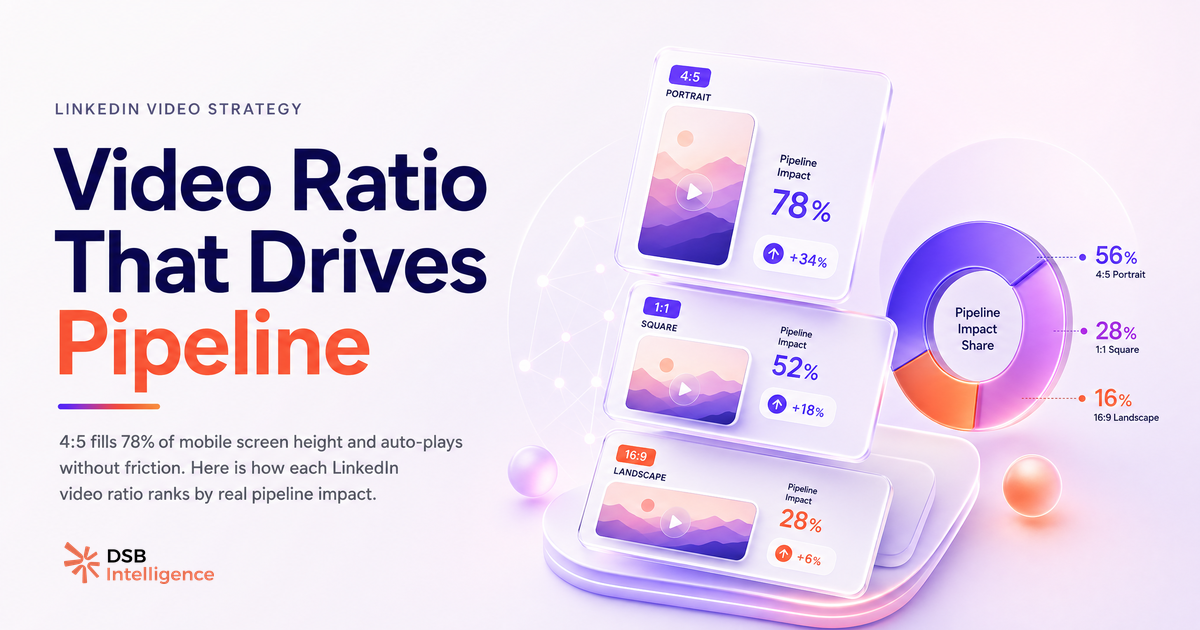
16:9 (landscape, 1920x1080) renders as a wide, short rectangle on mobile. On a standard smartphone screen, it fills roughly 30-35% of the visible height. The video auto-plays in that compact window. To watch it at full size, the viewer must tap. That tap is friction, and friction kills passive engagement before the first second of content registers.
1:1 (square, 1080x1080) performs better. It fills more vertical space than 16:9 and plays without requiring interaction. It became the default recommendation for social video around 2018-2019 precisely because it outperformed landscape on mobile feeds. On LinkedIn, it remains a solid, safe choice.
4:5 (portrait, 1080x1350) is the current high-water mark for organic B2B video. It fills approximately 78% of a mobile screen's visible height in the feed, plays automatically, and requires no tap to expand. The viewer is already watching before they decide whether to keep scrolling. That passive auto-play window is where dwell time accumulates.
9:16 (vertical, 1080x1920) is the full-screen format native to TikTok and Instagram Reels. On LinkedIn desktop, it is cropped into a portrait window and letterboxed. On mobile, it renders fully, but the feed still frames it with UI elements above and below. It does not provide a meaningful screen-space advantage over 4:5 in the LinkedIn context, and it creates a suboptimal experience for the significant portion of your audience still on desktop.
For paid placements, the calculus shifts. LinkedIn Video Ad Specs: What Actually Drives Results covers how ratio interacts with campaign objective and device targeting in the ads manager.
Why does the mobile-first shift make 4:5 the default choice for B2B content?
The majority of LinkedIn sessions now happen on mobile. That shift has been gradual but consistent across the past several years, and it has not reversed.
A portrait-oriented feed on a portrait-oriented device rewards portrait-oriented content. This is not a creative opinion. It is a geometry problem. The format that fills the most screen without requiring a user action wins the passive attention contest.
For B2B content specifically, the implication is direct. Your ICP is scrolling LinkedIn between meetings, on a phone, in a context where they will not stop to tap-to-expand a landscape video from a brand they don't already follow. The 4:5 frame gives your content a fighting chance at registering before the decision to engage is even made consciously.
The production cost of switching from 16:9 to 4:5 is low if you plan for it at the shoot stage. Reframing a 16:9 export into 4:5 post-production often means losing critical visual information at the edges. The better fix is to shoot with a 4:5 safe zone in mind from the start, keeping subjects and text centered.
Can You Post Video on LinkedIn? Format Changes Everything walks through how format decisions interact with reach mechanics for both personal profiles and company pages.
How does DSB Intelligence's Insight Narrator surface which ratio is actually driving dwell time on your account?
Aggregate benchmarks are useful as a starting point. Your account's own data is more useful.
The challenge is that LinkedIn's native analytics do not expose dwell time as a metric. You see views, impressions, and engagement rate. You do not see how long viewers stayed before scrolling, which is the signal most correlated with algorithmic distribution.
This is where DSB Intelligence's Insight Narrator becomes relevant. It reads the behavioral patterns across your posts, including video posts segmented by format, and surfaces which content types are generating sustained attention versus passive impressions. Instead of guessing whether your 4:5 videos outperform your 16:9 ones, you get a plain-language interpretation of what the data shows on your specific account, over your specific posting history, for your specific audience.
The output is not a dashboard to interpret. It is a diagnosis: here is what is working, here is what is not, and here is why the pattern makes sense given how your audience behaves.
When does 16:9 still win, and what is the one use case where 9:16 makes sense?
16:9 is not obsolete. It has specific contexts where it is the right call.
The clearest case is paid video ads where LinkedIn's player expands to fill the screen on click. In that context, the tap-to-expand friction is expected, the viewer has already signaled intent, and a widescreen product demo or webinar replay benefits from the cinematic framing. Landscape video was built for screens that are wider than they are tall, and those screens still exist in conference rooms and at desks.
The second case is repurposed webinar or event content. If the source material was recorded in 16:9 (a screen share, a panel recording, a product walkthrough), reframing it into 4:5 often degrades the content. In those cases, posting 16:9 with a strong text hook in the post copy is a better trade-off than distorting the visual to fit a ratio the content was not designed for.
For 9:16, the one legitimate organic use case on LinkedIn is native mobile-first content: short, vertical, shot on a phone, designed to feel like a direct message to the viewer rather than a produced asset. Think founder video, quick takes, behind-the-scenes. The format signals informality and immediacy. If that matches your content intent and your audience skews heavily mobile, 9:16 can work. For most B2B teams producing polished content, it is the wrong default.
The broader question of how video content fits into a B2B LinkedIn strategy, including how hiring signals reveal where the market is heading, is covered in LinkedIn Video Editor Jobs: What B2B Hiring Reveals. And if you manage a company page alongside personal profiles, LinkedIn Newsletter Cover Image Size: the Exact Specs is worth bookmarking for the adjacent format decisions.
Now what?
- Audit your last 10 video posts. Note the aspect ratio of each and compare view counts. If you have been defaulting to 16:9, you have a baseline to beat.
- Re-export your next video in 4:5 (1080x1350). If you are reframing existing footage, check that subjects and key text stay within the center safe zone before publishing.
- For your next paid campaign, test 16:9 against 4:5 with identical creative and copy. Let the device breakdown in your campaign report tell you which ratio your audience actually responds to.
- If you want to know which ratio is driving real dwell time on your account rather than guessing from view counts, start a free trial of DSB Intelligence and let the Insight Narrator read the pattern for you.