

Most agencies don't have a tool problem. They have a clarity problem.
The question isn't which social media manager tools to add. It's which ones to keep, and what each one is actually supposed to prove to a client.
What tools do social media managers actually use day-to-day (vs. what gets recommended)?
The real stack is shorter than any roundup post suggests.
Ask a social media manager at a ten-person agency what they open every morning, and the answer is almost always the same: a scheduling platform, a Slack or Teams channel with the client, and a spreadsheet or dashboard for reporting. That's it. The rest of the tools in the "top 50 social media tools" listicles either get used once a quarter or never get past the free trial.
The tools that survive in real agency workflows share three traits. They save time on a task that happens every week (not every quarter). They produce an output the client actually sees. And they don't require a 30-minute onboarding call every time a new team member joins.
Buffer, Hootsuite, Publer, and Later dominate the scheduling layer because they clear all three bars. They're not exciting. They work.
The community management layer is thinner. Most agencies handle comments and DMs directly inside the native platforms, or use a shared inbox tool like Agorapulse for high-volume accounts. The "social listening" tools that show up in every agency pitch deck (Brandwatch, Mention, Talkwalker) are real products, but they're priced for enterprise and used by a fraction of the agencies that claim to offer social listening as a service.
The honest picture: a functional agency social media workflow runs on two to four tools. Not fifteen.
The scheduling and publishing layer: where most stacks start and stop?
Scheduling tools solve the right problem, but they stop too early.
A scheduling platform answers one question: did the content go out on time? That's a necessary question. It's not a sufficient one. The moment a client asks "is this working?", a scheduling tool has nothing to say.
This is where most agency stacks stall. The scheduling layer gets built out carefully (approval workflows, content calendars, multi-account management). The reporting layer gets bolted on as an afterthought, usually a PDF export from the native platform or a Looker Studio template someone built two years ago and hasn't touched since.
The result is a reporting cadence that shows the client how busy the agency was, not whether the strategy is working. Impressions went up. Follower count grew by 47. Engagement rate was 2.3%. None of those numbers answer the question the client is actually asking, which is: "Is our LinkedIn presence helping us win business?"
For agencies managing B2B clients, this gap is structural. Scheduling tools were built for content operations. They were not built to answer business questions. Treating them as the primary reporting layer is the root cause of most agency-client friction around social media ROI.
If you're rethinking how you frame those deliverables, Marketing Monthly Report: Stop Sending Data Dumps is a useful reference for reframing what a report is actually supposed to do.
The reporting gap: why most tools show activity, not business impact?
Activity metrics are easy to produce. Business signals are harder to surface, and that's exactly why they matter more.
Impressions, reach, and follower growth are outputs of content operations. They tell you whether the machine is running. They don't tell you whether the machine is pointed in the right direction. A LinkedIn page can accumulate thousands of impressions from an audience that has zero overlap with the client's ICP. That's not a win. It's noise with good-looking numbers.
The reporting gap is widest on LinkedIn, for a structural reason. LinkedIn's native analytics are designed for single-account use. They show you what happened on your page. They don't show you how your content is building authority in a specific industry vertical, which audience segments are engaging most, or how your profile compares to competitors in the same space. For a B2B client who wants to know whether their LinkedIn investment is building pipeline-adjacent credibility, native analytics are nearly useless.
Generic social media dashboards don't close this gap. They aggregate LinkedIn data alongside Instagram and X, flatten everything into the same engagement-rate logic, and produce reports that look comprehensive but answer the wrong questions for B2B use cases.
The agencies that retain B2B clients long-term are the ones that learned to separate two reporting jobs: cross-channel activity reporting (where generic tools work fine) and LinkedIn-specific business signal reporting (where they don't).
This distinction also matters when you're advising clients on LinkedIn content strategy. The LinkedIn Ghostwriter: What Clients Pay For in 2026 piece covers how clients are increasingly tying ghostwriting briefs to performance data, not just content volume.
How does DSB Intelligence fill the LinkedIn analytics blind spot for agency reporting?
The blind spot is multi-client LinkedIn visibility. DSB Intelligence is built specifically to close it.
Most LinkedIn analytics tools are designed for individual creators or single-brand accounts. They work well for a founder tracking their own content performance. They break down the moment an agency needs to manage eight client LinkedIn pages from one place, generate client-ready reports with consistent formatting, and track the signals that matter for B2B positioning (not just engagement rate, but audience quality, content authority, and topic resonance over time).
DSB Intelligence's Insight Narrator is the feature that changes the reporting conversation with clients. Instead of handing over a data export and asking the client to interpret it, the Insight Narrator reads the performance pattern and surfaces what it means in plain language. An agency account manager can walk into a client call with a clear narrative: here is what shifted this month, here is why it matters, here is what we're adjusting. That's a different conversation than "your impressions were up 12%."
For agencies that have read the Expandi LinkedIn Automation Tool: Honest Review and are thinking carefully about which LinkedIn tools to trust with client accounts, the distinction between automation tools and analytics tools matters. DSB Intelligence sits firmly in the analytics layer: it reads and interprets data, it doesn't touch outreach or connection requests.
The multi-client dashboard also addresses a practical agency pain point: LinkedIn's native interface forces you to log in and out of each client account separately. Aggregating performance across a client portfolio in one view, with consistent metrics, is the baseline requirement for any agency doing LinkedIn at scale.
Building a lean agency stack: what does the 3-layer framework look like?
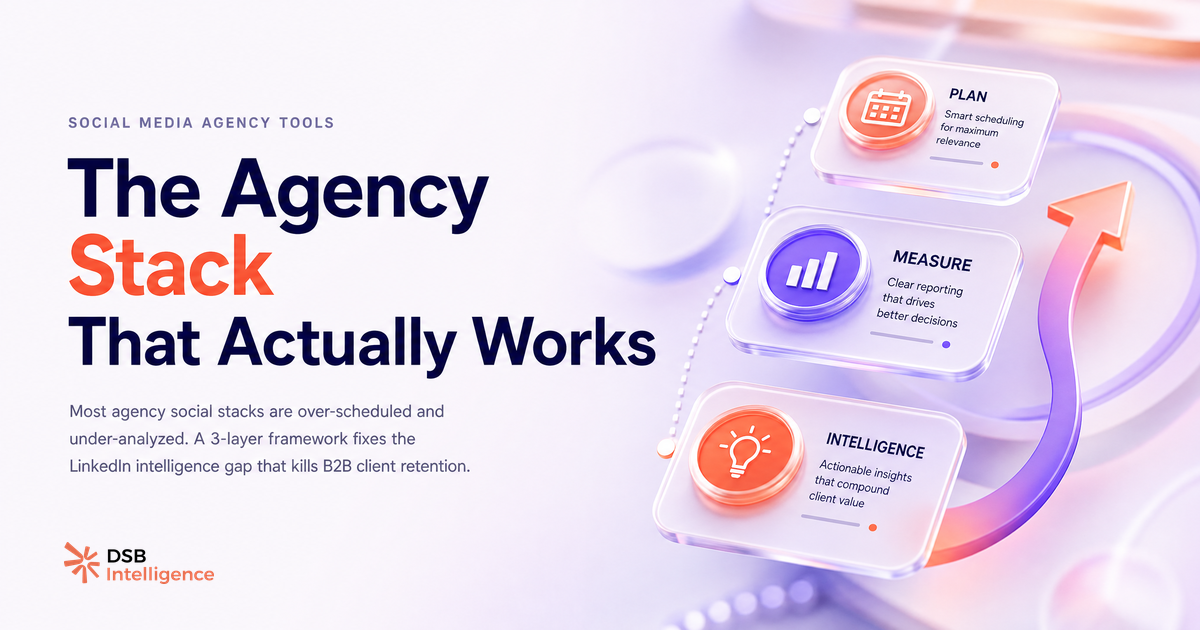
Three layers. One tool per layer. No overlap.
Layer 1: Scheduling and publishing. Pick one platform and standardize on it across all clients. Buffer and Publer are the strongest choices for small-to-mid agencies on cost-to-feature ratio. Hootsuite works for larger teams that need granular permission structures. The goal of this layer is operational: content goes out on time, approvals are tracked, nothing falls through.
Layer 2: Cross-channel reporting. A Looker Studio template connected to native platform APIs covers most agencies' needs here. For agencies that want a more polished client-facing product, tools like Whatagraph or AgencyAnalytics add presentation value. This layer answers the activity question: what went out, when, and how did it perform across channels.
Layer 3: LinkedIn intelligence. This is the layer most agencies are missing. For B2B clients, LinkedIn is the channel where authority is built and deals begin. A dedicated LinkedIn analytics layer tracks the signals that matter for that outcome: which content is building topical authority, which audience segments are engaging, how the client's profile compares to peers in their space.
The three-layer framework works because each tool has a single job. There's no feature overlap to manage, no "we already pay for that in tool X" confusion, and no bloated all-in-one platform that does five things at 60% quality.
Industrial B2B clients, in particular, benefit from this structure. The LinkedIn Rockwell Automation: What Industrial B2B Can Learn piece shows how even complex, long-cycle B2B businesses use LinkedIn content to build credibility with buyers who won't convert for months. Tracking that credibility-building requires a different analytics lens than tracking a consumer brand's engagement rate.
One final note on stack hygiene: more tools is not more capability. Every tool in the stack is a login to manage, a cost to justify, and a data source to reconcile. The agencies that run the tightest operations are the ones that can explain, in one sentence, what each tool does and what client question it answers. If you can't do that for a tool in your current stack, that's your answer.
Now what?
- Audit your current stack against the three-layer framework. Identify which layer has the most tools (usually scheduling) and which has the fewest (usually LinkedIn intelligence).
- Pull your last three client reports. Count how many metrics connect directly to a business outcome vs. how many are activity metrics. If the ratio is worse than 1:3, the reporting layer needs work.
- If you manage B2B clients on LinkedIn, test a dedicated LinkedIn analytics tool for one client account for 30 days. Compare the narrative you can build with that data vs. what you had before.
- Standardize your reporting format before adding new tools. A better template with existing data beats a new tool with no reporting discipline.
Ready to close the LinkedIn analytics gap for your agency clients? Start a free trial of DSB Intelligence and run your first multi-client LinkedIn report in under 10 minutes.