

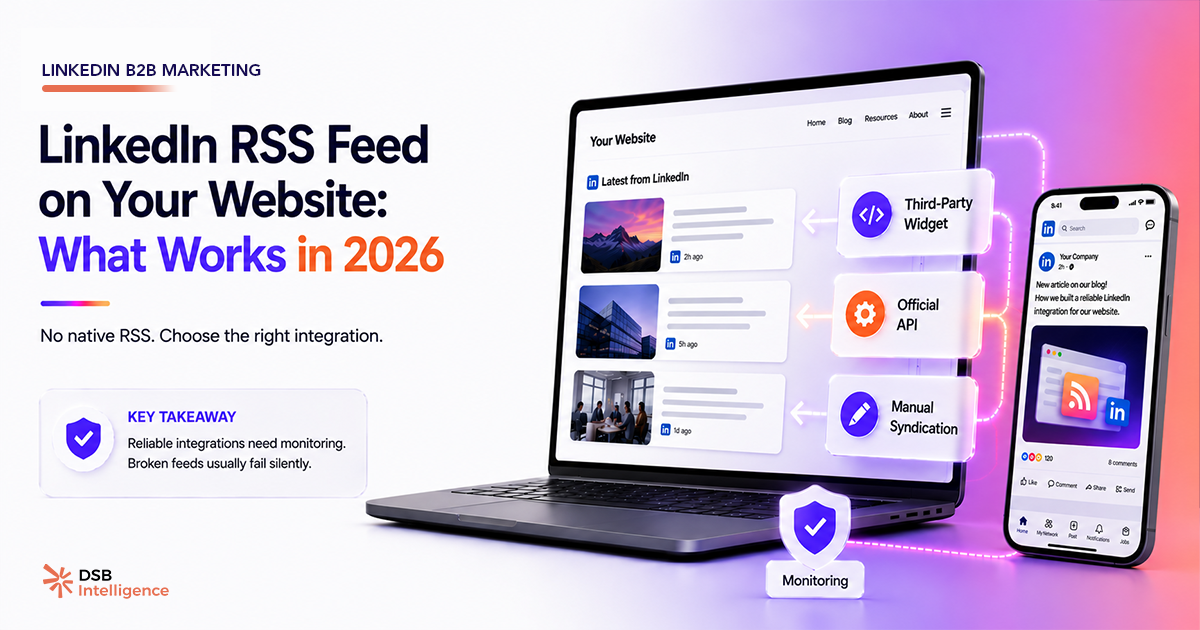
LinkedIn killed its native RSS feeds quietly, and most of the tutorials still ranking on Google haven't caught up. If you're following one of them, you're probably building on a foundation that's already gone.
Why is there no LinkedIn RSS feed to embed on your website?
LinkedIn removed RSS support for profiles and company pages a long time ago — it was never a priority for a platform built around keeping users inside its walls.
What you find today when you search for "LinkedIn RSS feed" is a mix of third-party workarounds, browser extensions, and widget services. None of them use an official LinkedIn RSS endpoint, because that endpoint doesn't exist. They either scrape the page, use undocumented API calls, or rely on a thin layer of LinkedIn's Marketing Developer Platform that can be revoked at any time.
This matters because the failure mode is silent. Your widget appears to work, then one day LinkedIn updates something, and the feed stops refreshing — often without an error message. Visitors see stale posts from six months ago, or nothing at all.
As covered in LinkedIn.com/feed Is Not an RSS Feed, the LinkedIn feed is a ranked, personalized content surface — not a chronological data stream you can subscribe to. The architecture is fundamentally incompatible with the RSS model.
What are the real options for embedding a LinkedIn feed on your website?
You have three routes, each with a distinct risk profile.
Third-party widget services (Elfsight, Taggbox, SnapWidget, and similar) are the fastest to set up. You paste a script tag, configure a display, and you're live in under an hour. The problem: these services depend on either scraping or unofficial API access. LinkedIn has a documented history of tightening API policies — the 2018 API policy changes forced several third-party tools to shut down or significantly limit their features, and others have had intermittent outages since. You're renting stability from a vendor who doesn't control the underlying data source.
Manual or semi-automated republishing is the most durable approach. You publish on LinkedIn first, then push a version of the same content to your website — either as a blog post, a "latest updates" section, or a curated feed built with your own CMS. Tools like Zapier or Make can partially automate this: a new LinkedIn post triggers a draft in your CMS, which a human reviews and publishes. It's more work, but you own the pipeline.
LinkedIn API integration is technically the most powerful option. The LinkedIn Marketing Developer Platform exposes endpoints for posts and engagement data. The catch: access to content endpoints is gated behind partner-level approval. Unless your organization has gone through LinkedIn's formal application process — which requires a business justification and review — you won't get the credentials needed to pull post content programmatically.
For most websites, the realistic choice is between option one (fast, fragile) and option two (slower, stable). If you're also running paid campaigns alongside your organic content, LinkedIn Advertising B2B: Why Your Campaigns Underperform is worth reading — the same API access constraints affect what you can pull from the ads side.
Does embedding LinkedIn content on your website actually help your LinkedIn reach?
No — and this is a common misconception worth addressing directly.
LinkedIn's distribution algorithm operates entirely within its own platform. It measures signals like dwell time, saves, comments, and reshares — all of which happen inside LinkedIn. An external website embedding your posts sends zero signal back to LinkedIn's ranking system.
If your goal is to grow your LinkedIn reach, the levers are on LinkedIn itself: posting cadence, format, timing, and audience relevance. LinkedIn Content Strategy B2B: Stop Planning in the Dark covers how to read those signals systematically, and What "Impressions on LinkedIn" Actually Means explains why raw impression counts can mislead you about actual content performance.
Understanding the gap between impressions and actual audience reach is also worth your time: LinkedIn Impressions vs Members Reached: What the Gap Reveals breaks down why those two numbers diverge — and what that divergence tells you about your content's real distribution.
Embedding a feed on your website is a credibility signal for website visitors, not a LinkedIn growth tactic. Treat it as such.
What breaks silently — and how do you catch it?
The most dangerous failure mode with any LinkedIn feed widget is the silent stale state: the widget renders, looks fine, but hasn't pulled new content in weeks.
A few things to watch for:
- Widget loads but shows old posts. Check the timestamp on the most recent post displayed. If it's more than two weeks behind your actual LinkedIn activity, the integration has broken.
- Widget loads slowly or blocks page rendering. Third-party scripts loaded synchronously can delay your page's Largest Contentful Paint (LCP). Google's Core Web Vitals threshold for LCP is 2.5 seconds — if your score degrades after adding a widget, the widget script is the first place to investigate. Load it asynchronously or defer it to eliminate the bottleneck. If the widget disappears entirely, the vendor's service has likely gone down or their API access was revoked — more common than most teams expect.
DSB Intelligence's Insight Narrator surfaces this kind of gap from the LinkedIn side: if your posts are performing on LinkedIn but your website's "latest posts" section is showing content from three months ago, that's a distribution mismatch worth flagging. It won't monitor your widget directly, but it gives you a clear view of what your LinkedIn content is actually doing — so you know when the two surfaces have drifted apart.
Is there a format that holds up better than a live feed?
Yes. A static or semi-static approach often outperforms a live widget on both reliability and user experience.
Instead of a live feed, consider:
- A curated "Featured Posts" block — three to five posts, manually selected, updated quarterly. No API dependency, no breakage risk.
- A "Latest thinking" section that pulls from your blog or newsletter, with a link to your LinkedIn profile for visitors who want to follow you directly.
- A screenshot-based showcase — a designed layout with static images of your best-performing posts, linked to the original LinkedIn URL. Zero technical dependency, zero maintenance overhead.
These approaches won't auto-update, but they also won't silently break. For most B2B websites, the content that matters most is evergreen anyway — a post from eight months ago that articulates your positioning is more valuable than yesterday's update about a conference.
The honest trade-off: live feeds optimize for recency, static blocks optimize for reliability. If your LinkedIn posting cadence is irregular, a live feed will expose that gap to every website visitor. A curated block lets you put your best work forward regardless of cadence.
Now what?
- Audit your current setup. If you have a LinkedIn widget live on your site, check the timestamp of the most recent post it displays. If it's stale, it's already broken.
- Decide on your risk tolerance. If you need something live today, a third-party widget is fine — just document the dependency and set a calendar reminder to check it monthly.
- Build toward ownership. Set up a Zapier or Make workflow that drafts a CMS post every time you publish on LinkedIn. Even if you don't publish every draft, you'll have the content ready.
- Decouple your LinkedIn growth from your website. Track your LinkedIn performance inside LinkedIn — or with a tool built for it. Start a free trial of DSB Intelligence to get a clear read on what your LinkedIn content is actually doing, independent of whatever widget is running on your site.